
ABNCMS Documentation#
A complete guide from getting started to production. ABNCMS is a free, open-source lightweight CMS built for Cloudflare Workers + D1 + an external image host — no server, no hosting fees, a single production dependency (Hono), and everything within Cloudflare's free tier.
This manual covers product overview, environment setup, local development, deployment, system architecture, admin usage, API and image hosting, caching, plus FAQs and troubleshooting. Current version v0.2.7, built on Cloudflare Workers.
Truly Zero Cost
Runs entirely on Cloudflare's free plan — no server, no credit card.
Global by Default
Pages cached at the edge, served close to visitors, with HTTPS and DDoS protection built in.
Admin, Always Editable
Write posts and upload images in a visual admin — changes go live instantly, no rebuild.
Lightning Edge Cache
Cache hits mean zero database queries; publishing bumps the cache generation for site-wide instant updates.
Core Features#
A single Worker handles front-end SSR, the admin panel, APIs and scheduled jobs — broad coverage at a tiny footprint.
Front End#
- Homepage banner, post stream (pretty URLs
/p/{slug}.html), standalone pages (/page/{slug}.html) - Custom navigation, categories / tags / archive, full-text search, Markdown rendering
- AI summaries, previous/next links, related posts, comments (built-in analytics off by default)
- RSS (
/feed.xml), Sitemap (/sitemap.xml), JSON-LD structured data - Two-column sidebar (popular posts, categories, tags, links), responsive layout
Admin Panel#
- Login protection: PBKDF2 password + KV sessions + per-IP rate limiting + Turnstile CAPTCHA
- Post CRUD, two-column Markdown editor, AI summary & tags
- Visual image-host URL/token config, site logo upload, third-party analytics script
- Standalone pages, navigation menu, friend links, media library, categories, comment moderation
- Full export / import backup, site settings, password change, dashboard
Scheduled Jobs (Cron)#
Daily at 03:00 UTC, cleans page-view records older than 30 days and spam comments older than 90 days, and writes a heartbeat.
Requirements#
| Item | Requirement | Notes |
|---|---|---|
| Node.js | 20+ (22 LTS recommended) | Runs Wrangler and local dev |
| Python | 3.8+ | Helper scripts and smoke tests only, standard library, no pip |
| Cloudflare account | Free plan is enough | No credit card required |
| Wrangler | Included as devDependency | Invoke with npx wrangler |
| workers.dev subdomain | Register once in advance | OAuth login cannot create it via API; register manually in the dashboard |
hono. Strict-mode TypeScript, esbuild bundled by Wrangler — no extra build tooling needed.Quick Start#
The shortest path from cloning the repo to seeing a live page.
Clone the project
git clone https://github.com/baiyirui/abncms.git && cd abncms
Install dependencies
npm install
Prepare configuration
Copy wrangler.example.jsonc to wrangler.jsonc and .dev.vars.example to .dev.vars, then fill in resource IDs and the admin password.
Init local DB and start
npm run db:local → npx wrangler d1 execute cf-press-db --local --file=./seed.sql → npm run dev
Open it
Visit http://127.0.0.1:8787; the admin is at /admin/login.
# Clone and enter the project
git clone https://github.com/baiyirui/abncms.git && cd abncms
npm install
# Configure (fill in account_id / D1 / KV IDs)
cp wrangler.example.jsonc wrangler.jsonc
cp .dev.vars.example .dev.vars
# Initialize the local database
npm run db:local
npx wrangler d1 execute cf-press-db --local --file=./seed.sql
# Start the local dev server
npm run dev   # → http://127.0.0.1:8787
Local Development#
Wrangler provides a local environment matching production — D1, KV and cron jobs are all simulated locally.
Common commands#
| Command | Purpose |
|---|---|
npm run dev | Start local server (wrangler dev) |
npm run typecheck | TypeScript check (tsc --noEmit) |
npm run build | Dry-run build into dist/ without deploying |
npm run db:local | Create local tables (schema.sql) |
npm run smoke | Smoke test for core pages and APIs |
npx wrangler types | Generate Worker type declarations from config |
Initial admin#
Only when the users table is empty on first login does the system create the initial admin using ADMIN_PASSWORD from .dev.vars. Change the password in the admin settings immediately after logging in.
baiyirui), delete the local D1 user data so ensureAdmin() recreates admin from .dev.vars. The local database lives under .wrangler/.Smoke test#
SMOKE_ADMIN_USER=admin SMOKE_ADMIN_PASS='your-password' \
  python scripts/smoke_test.py http://127.0.0.1:8787
Deployment#
Use the helper script to create remote resources and write back IDs, then deploy to the global edge with one command.
Log in to Cloudflare
npx wrangler login
Create remote resources
python scripts/setup_remote.py creates D1 / KV / Vectorize and writes the returned IDs back to wrangler.jsonc.
Initialize database
New database: npm run db:remote. Upgrading an existing site: do not re-run schema — use npm run db:migrate instead.
Inject secrets
Set the admin password, encryption key, etc. (see next section).
Deploy
npm run deploy. Afterwards set SITE_URL in wrangler.jsonc to the real URL and deploy once more.
npx wrangler login
python scripts/setup_remote.py
npm run db:remote          # create tables for a new DB
# for upgrades use: npm run db:migrate
npx wrangler secret put ADMIN_PASSWORD
npx wrangler secret put CONFIG_ENCRYPTION_KEY
npm run deploy
schema.sql and overwrite admin settings. Incremental migration only adds missing keys and never overwrites modified site name / password / tokens.Custom domain#
After deployment, add a custom domain in the Cloudflare Workers dashboard and point DNS accordingly, or simply use the free *.workers.dev subdomain. HTTPS certificates are issued automatically.
Configuration & Secrets#
Configuration comes in three kinds: resource bindings in wrangler.jsonc, sensitive secrets via wrangler secret put, and site info maintained in the admin.
| Name | Location | Purpose |
|---|---|---|
account_id / database_id / kv id | wrangler.jsonc | Resource bindings, not stored in DB |
SITE_NAME / SITE_DESCRIPTION / SITE_URL | vars | Site info, editable in admin |
TURNSTILE_SITE_KEY | vars | Pair-replaced with the admin secret |
IMGBED_BASE_URL / IMGBED_TOKEN_NAME | vars | Image host in environment-variable mode |
ADMIN_PASSWORD | Secret | Only for initial admin creation |
CONFIG_ENCRYPTION_KEY | Secret | Encrypts admin-written tokens (32-byte random string) |
IMGBED_TOKEN | Secret | Image host token in environment-variable mode |
site_logo / imgbed_* | D1 settings | Admin-maintained (token stored encrypted) |
openssl rand -hex 32
npx wrangler secret put CONFIG_ENCRYPTION_KEY
Turnstile CAPTCHA: three states#
- off / empty: fully disabled — no component loaded, login passes through (useful where
challenges.cloudflare.comis unreachable) - official test keys: always pass
- real keys: Site Key (vars) and Secret (admin settings) must be replaced as a pair, then redeploy
wrangler.jsonc, .dev.vars and temporary diagnostics are all in .gitignore. Never commit config containing secrets to a public repo.System Architecture#
The system is designed around "let the edge cache handle almost all reads".
Browser ──► Cloudflare Worker (Hono SSR / admin / API / Cron)
              │  Anonymous visitors first check full HTML in edge Cache API
              │  (key includes the cache_gen generation)
              │  ├─ hit  → return directly, 0 D1 / 0 KV
              │  └─ miss → read D1, render, async-write edge cache (no KV quota)
          ├── D1        posts · pages · users · categories · tags · comments · settings
          ├── KV        sessions · settings · sidebar · rate limits
          ├── Workers AI + Vectorize   summaries / tags / semantic search (off by default)
          └── External image host   POST /upload (token injected server-side)
Tech stack#
Strict-mode TypeScript · Cloudflare Workers (V8 isolate, not Node) · Hono routing · Wrangler's built-in esbuild. Only hono in production dependencies.
Typical flows#
- Publishing:
POST /admin/post/*→ same-origin check → Markdown render → upsert posts / post_tags →bumpCacheGen()increments the generation, instantly invalidating cached pages. - Uploading:
POST /api/upload(FormDatafile+ optionalchannel) → Worker injectsAuthorization: Bearer→ image host/upload→ external URL saved to media → URL returned into the editor. - Anonymous article read: read settings → look up "full URL + cache_gen" in Cache API → hit returns directly (0 D1, 0 KV); miss queries D1, renders, and
waitUntilwrites the edge cache.
Caching#
The heart of the design. Page HTML lives in Cloudflare Cache API (no KV write quota); the cache key = full URL (including ?page=) + cache_gen generation, TTL 7 days.
Instant updates on publish#
On publish, edit, delete, comment, category or settings change, only cache_gen is +1 (one D1 write). Old cache entries instantly stop matching, so the whole site shows new content within a second — no purge, no per-page deletion. Using the full URL as key also fixed a pagination cross-page bug.
x-abn-cache: HIT / MISS tells you whether the edge cache was hit.Request cost by scenario#
| Scenario | Workers | D1 | KV |
|---|---|---|---|
| Anonymous front end, cache hit | 1 (very light) | 0 | 0 |
| Anonymous front end, miss | 1 | a few reads | 1–2 reads |
| Page cache disabled | 1 | a few reads | read settings/sidebar |
| Admin / search / logged in | 1 | read + write | read + write |
- Logged-in responses are always no-store: drafts and admin pages never enter the cache.
- 404 pages carry a
<!--nocache-->marker so errors aren't cached for 7 days. - New posts default to "published": visible on the homepage immediately; only an explicit "draft" selection hides them.
- Settings/sidebar cache TTL is 6 hours: KV allows only 1,000 writes/day; 6 hours reduces this to 4/day, and saves actively invalidate the cache so nothing goes stale.
Page views#
Views are sampled at 25% on the client → POST /api/hit → aggregated with a ×4 weight and written to D1. This is an estimate, not an exact metric. /api/hit validates same-origin, an internal path whitelist and a weight cap. It is recommended to disable built-in analytics and use the admin "third-party analytics script" instead (Baidu Analytics / GA / Umami); the script is injected verbatim at the bottom of the front end, and turning off built-in analytics brings analytics cost on D1 / KV to zero.
Free Tier#
Verified against official docs (updated 2026-10-30); all daily quotas reset at 00:00 UTC.
| Resource | Free quota | Design implication |
|---|---|---|
| Workers | 100k requests/day, 10ms CPU/request, 50 subrequests | Keep each render light |
| D1 | 5M rows read / 100k rows written / 5 GB | Billed by rows scanned; lists must use indexes |
| KV | 100k reads / 1,000 writes / 1 GB | No KV writes on front-end requests |
| Workers AI | 10k neurons / day | AI features can degrade gracefully |
| R2 | 10 GB / month | Not used by this project |
Admin Panel#
Visit /admin/login. The left navigation covers all management features.
| Module | Features |
|---|---|
| Dashboard | Counts of posts, drafts, comments, media, views |
| Posts | Create / edit / delete, two-column Markdown editor, AI summary & tags |
| Pages | Standalone page management (/page/{slug}.html) |
| Categories / Tags | Category CRUD; one-click top menu generation from categories |
| Comments | Moderation (approve / delete) |
| Media | List and delete uploaded images |
| Links / Menu | Friend links and navigation menu |
| Settings | Site info, logo, image host, analytics script, feature toggles, password |
| Backup | Full JSON export / import |
Ctrl+F5 for a hard refresh.Security#
- Passwords hashed with salted PBKDF2-SHA256; session cookies
HttpOnly+SameSite=Lax+Secureover HTTPS, valid 7 days - All admin writes verify login state and same-origin; login has per-IP failure rate limiting
- Markdown output fully escaped; all SQL uses parameterized bindings
- Image-host token: AES-GCM encrypted at rest, masked in UI, never logged, excluded from backup exports
Feature Toggles#
Settings → Feature Toggles independently controls each capability. When disabled, the corresponding D1 / KV query or write does not execute at all. Small sites should keep only page cache + popular posts.
| Setting | Default | Purpose |
|---|---|---|
enable_page_cache | On | Edge cache for page HTML |
enable_hot | On | Popular posts sidebar |
enable_related | On | Related posts |
enable_prevnext | On | Previous/next post |
allow_comments | On | Comments |
enable_links | Off | Friend links module |
enable_semantic | Off | Semantic search (Vectorize) |
enable_ai | Off | AI summary & tags (Workers AI) |
analytics_enabled | Off | Built-in analytics (writes D1) |
/api/hit requests.Image Host & Media#
Images are uploaded to any compatible image host and referenced by external URL. The Worker injects the token server-side so it never reaches the browser. R2 is not used.
Configuration priority#
Admin D1 (AES-GCM encrypted) > wrangler vars / Secret > unconfigured
- The master key
CONFIG_ENCRYPTION_KEYis injected viawrangler secret put; it is never stored in DB or echoed in the UI. - The admin settings page shows only the last 4 characters of the token; an empty input means "unchanged"; you can clear it and fall back to environment variables.
- "Test connection" calls the host's
GET /api/channelswithout uploading a test image. - Without the master key the system falls back to "environment-variable mode", where the admin can only change the URL.
Image host API contract#
POST /upload with header Authorization: Bearer <TOKEN> and field file; supports returnFormat=full, responseFormat=object, uploadChannel=s3|huggingface; delete via POST /api/manage/delete/{fileId}.
Site logo#
The logo reuses /api/upload through the image host. Recommended display height 32–40px, 2x source 64–80px, width ≤200px, SVG preferred. With no upload it defaults to an inline "icon + site name" style that updates automatically when the site name changes.
Build Your Own Image Host#
ABNCMS does not store images itself — every image is referenced by an external URL. The previous section covered connecting an existing image host. This section walks you through building a fully private, permanently free image host whose files live in your own repository, providing external links for your articles and logo.
The screenshots in this chapter come from the open-source project CloudFlare-ImgBed (MIT license) — for deployment-method reference only. You can also view the source repository or visit the official docs. Review the license and security of any third-party program before using it.
Overview#
The whole setup has three roles, each with one job: Cloudflare Pages hosts the image-host app for free (global acceleration, unmetered traffic), Workers KV stores channel configuration, and a HuggingFace repository acts as the file store. Files land in your own repository, not on anyone else's server.
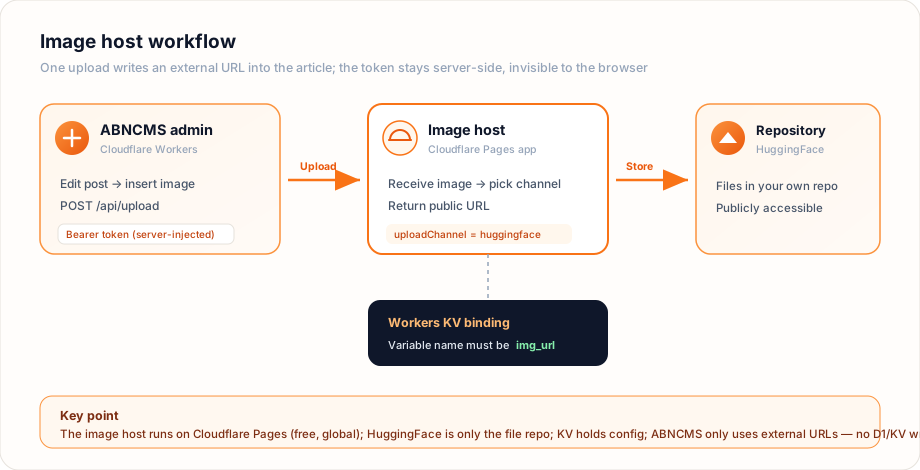
Real interface screenshots captured during deployment (original watermarks removed).
- Free to deploy: Pages and KV both fit within Cloudflare's free plan — no credit card required.
- Unmetered traffic: images are served from Cloudflare's edge; reading them consumes no ABNCMS D1 / KV quota.
- You own the files: images end up in your own repository — download or migrate them any time.
- Generous capacity: free repository quotas are plenty for personal sites and small-to-medium content sites.
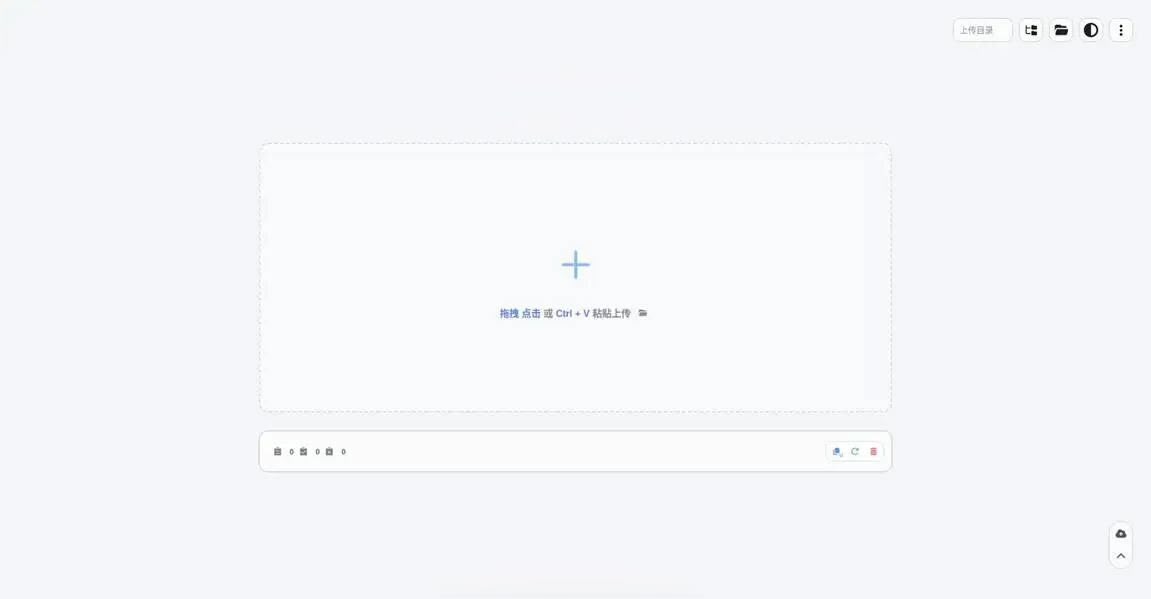
Prerequisites#
- A Cloudflare account (for Pages and KV).
- A GitHub account (to fork the image-host source).
- A HuggingFace account (to store image files).
Step 1: Fork the image-host source#
Find an open-source image host that supports Cloudflare Pages deployment and a HuggingFace upload channel, then click Fork to copy it into your own account. Check three things:
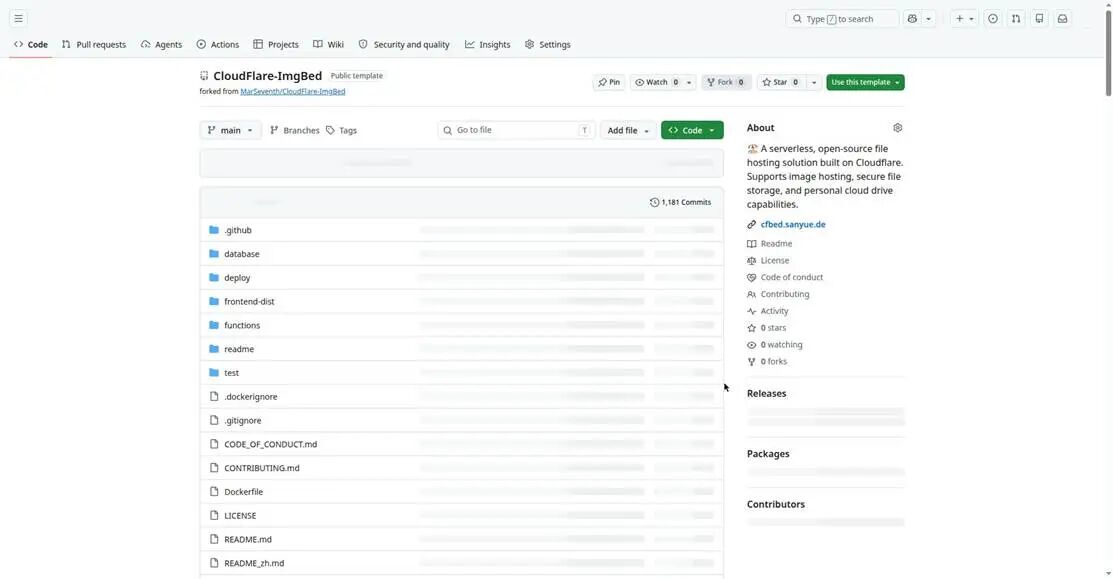
- The repo includes the build scripts and
wrangler/ frontend directory structure needed by Pages. - The README states the build command and output directory (this guide uses
npm install+/frontend-distas an example — follow your chosen project's docs). - The admin panel supports multiple storage channels with customizable channel names and upload parameters — essential for ABNCMS integration.
Step 2: Deploy the image host on Cloudflare Pages#
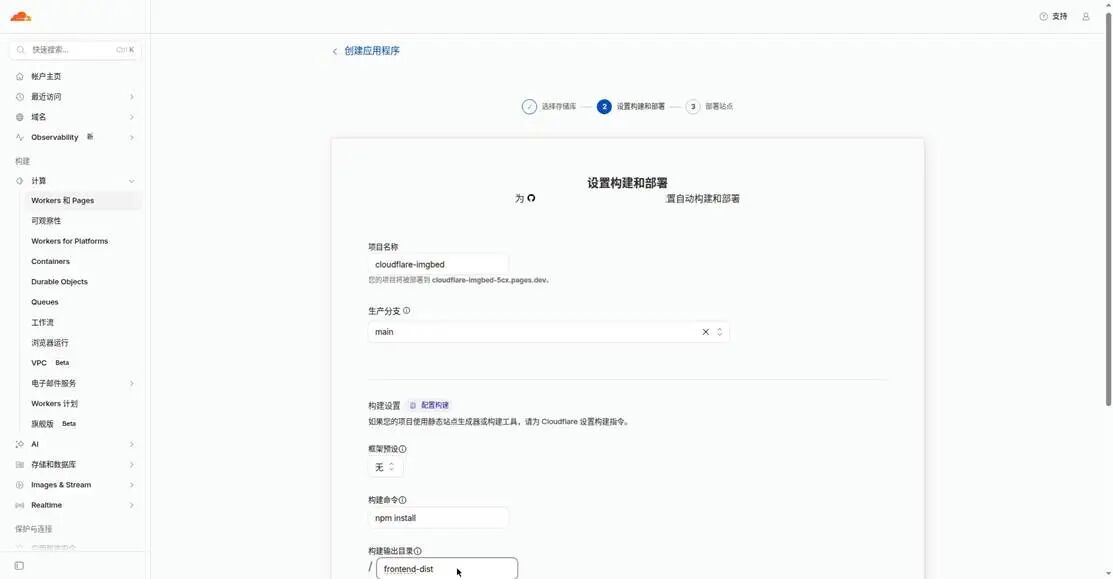
In the Cloudflare dashboard go to Workers & Pages → Create application → Pages → Import from Git, pick your fork, and fill in the build settings as shown.
Step 3: Create and bind a Workers KV namespace#
The image host uses KV to store channel configuration. Create a namespace and bind it to the Pages project:
- Cloudflare dashboard → Workers & Pages → KV → Create a namespace; the name is arbitrary, e.g.
img_url. - Open the Pages project → Settings → Bindings → Add → select KV namespace.
- Set the "Variable name" to exactly
img_url, choose the namespace you just created, and save. - After binding, redeploy the project once for the change to take effect.
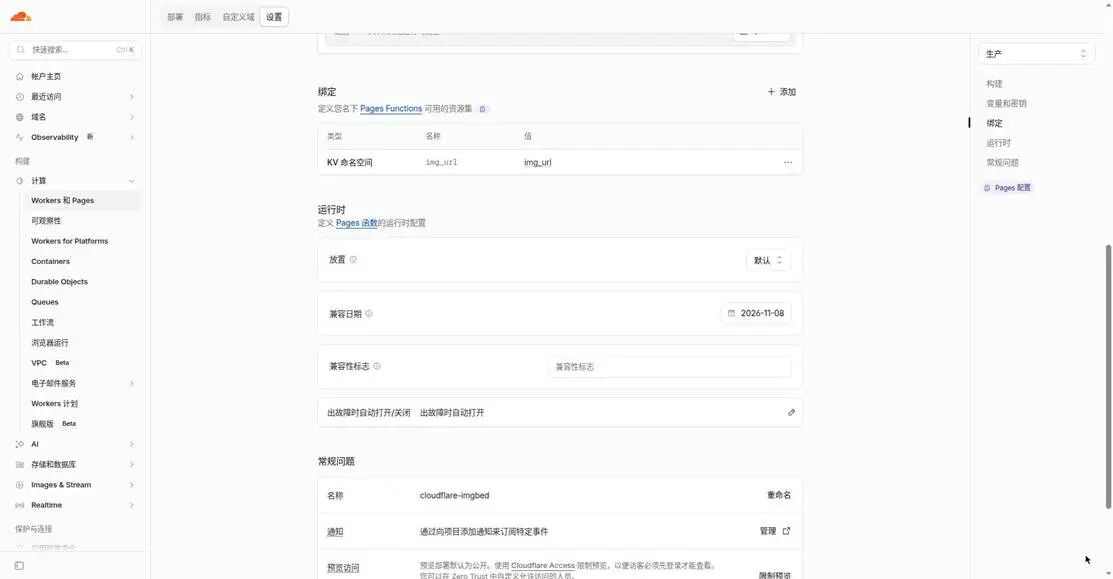
img_url is hard-coded in the image host's source. Using IMG_URL, kv, or any other name means the app cannot read the configuration and the admin panel will misbehave.Step 4: Create a HuggingFace write token#
The image host needs a token with write access to push images into your repository.
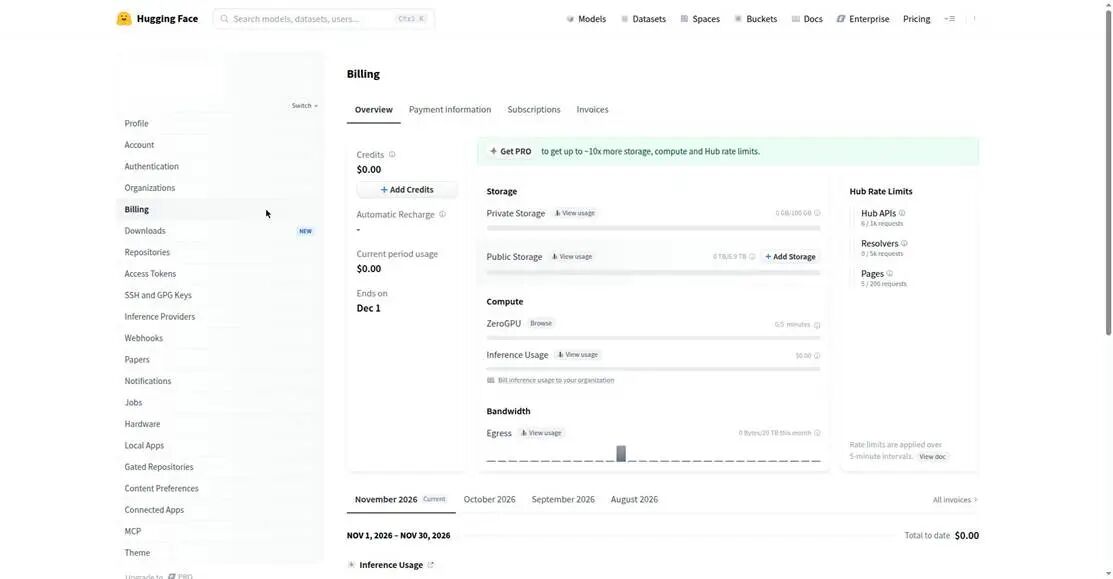
- After signing in, click your avatar → Settings → Access Tokens → Create new token.
- Set Token type to Write (a Read-only token cannot upload).
- Give it a recognizable name and copy the token immediately — the full value is shown only once and cannot be retrieved later.
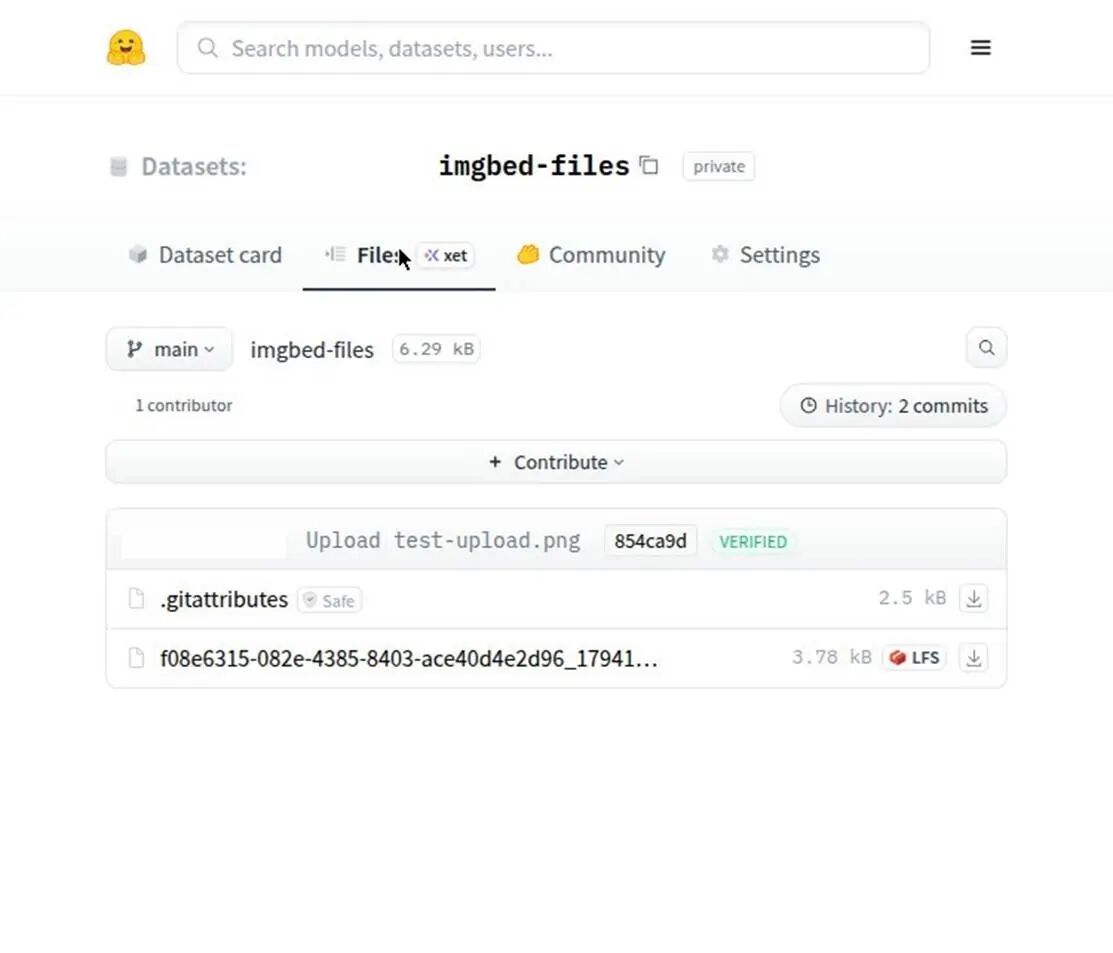
Step 5: Prepare the image repository#
Create a new repository on HuggingFace to hold your images and note its full name in the format username/repo-name (e.g. abncms/gallery). An empty repository is enough — the app writes files into it on first upload. For public external links without authentication, make the repository public; a private repository requires extra auth handling.
Step 6: Add the HuggingFace channel in the image host#
Open the Pages URL assigned to your image host and go to System Settings → Upload Settings → Add HuggingFace channel, then fill in the four fields as shown.
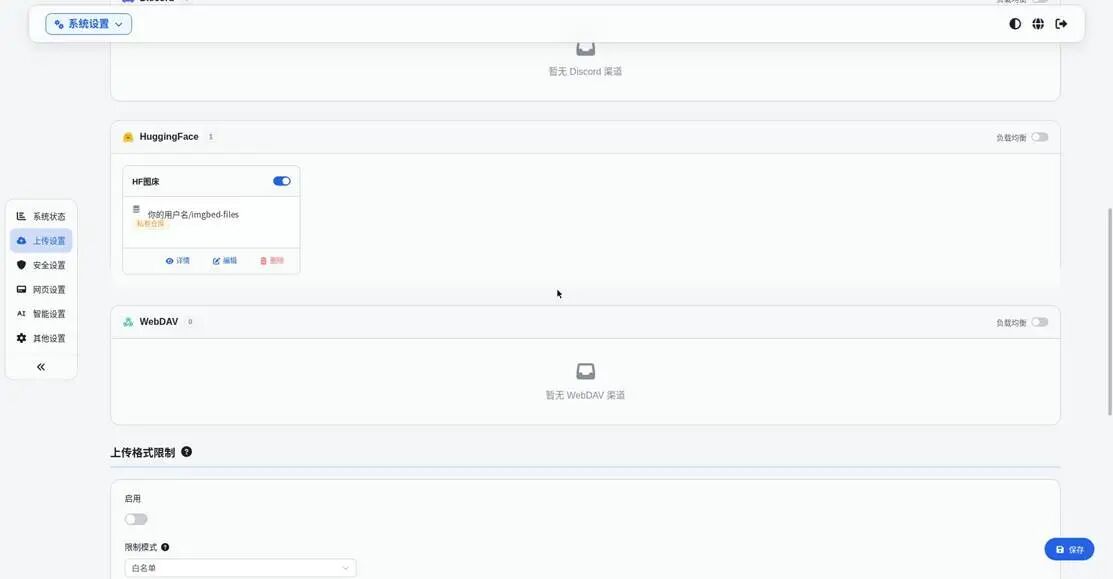
| Field | Value |
|---|---|
| Channel name | A custom label such as hf-main; you'll pick this when setting the default channel |
| Token | The HuggingFace Write Token copied in Step 4 |
| Repository name | username/repo-name, e.g. abncms/gallery |
| Private toggle | Match the repository's actual visibility; turn off for public repos |
Save, then click "Test connection" to verify the channel (it checks connectivity only and does not upload a test image).
Step 7: Make the channel the default#
In Client Settings, set the default upload type to HuggingFace and the channel name to the one you created in Step 6. This step is the most commonly missed.
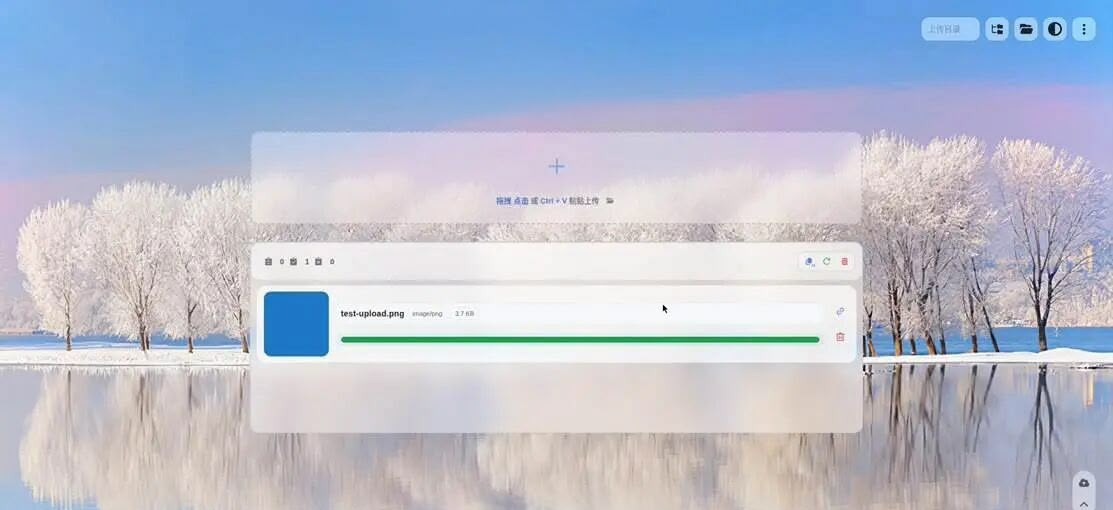
Step 8: Verify with a test upload#
- Back on the image host home page, drag in an image and copy the returned public URL.
- Open the URL in a new tab — a
200response showing the image means success. - Check your HuggingFace repository to confirm the file was created automatically.
Using this image host in ABNCMS#
With the image host ready, go back to ABNCMS admin → Settings → Image Host:
- Base URL: the Pages URL of your image host (e.g.
https://your-host.pages.dev). - API Token: the upload token generated in the image host admin — not the HuggingFace token.
- Click "Test connection", then save. From then on, inserting images in the editor or uploading a logo goes through
/api/upload, with the Worker injecting the token server-side so the browser never sees the secret.
Cost and quotas#
| Component | Role | On the free plan |
|---|---|---|
| Cloudflare Pages | Host the image host app | No server cost, global acceleration; image reads don't count toward ABNCMS |
| Workers KV | Store channel config | Only a small config object — well below free read/write limits |
| HuggingFace repo | Store image files | Free repository quota; you own the files and can export anytime |
Free quotas change over time — check each provider's current terms before signing up. This setup has no server cost and does not consume your ABNCMS site's D1 write quota.
Troubleshooting#
| Symptom | Where to look |
|---|---|
| "Channel not configured" or uploads hit the wrong channel | Check Step 7 — is the default channel switched to HuggingFace? |
| Config not read / disappears after saving | Confirm the KV variable name is img_url and that you redeployed after binding |
| External link returns 403 / asks for login | Repository is private — make it public or configure auth per the project docs |
| Blank page after Pages deployment | Wrong build command or output directory — fix using the forked repo's README |
| ABNCMS test connection fails | Use the image host API Token (not the HuggingFace token) and ensure the host URL is publicly reachable |
API Reference#
Main routes below; public front-end routes and admin routes are kept separate.
Public front-end routes#
| Path | Description |
|---|---|
/ | Homepage |
/p/{slug}.html | Article (old /p/{slug} 301-redirects here) |
/page/{slug}.html | Standalone page |
/c/{slug} / /t/{slug} | Category / tag page |
/tags / /archive / /search | Tag cloud / archive / search |
/feed.xml / /sitemap.xml | RSS / sitemap |
/comment | Post a comment (POST) |
/media/* | Legacy media file reads |
Admin & system APIs#
| Path | Description |
|---|---|
/admin/login / /admin/logout | Login / logout |
/admin/post/* / /admin/page/* | Post / page CRUD (auth required) |
/admin/settings | Site settings (auth required) |
/admin/backup/export|import | Backup export / import |
/api/upload | Image upload (auth required) |
/api/preview | Markdown preview (auth required) |
/api/ai/summary-tags | AI summary & tags (auth required) |
/api/hit | View beacon (public, same-origin check) |
/api/health | Health check |
Directory Structure#
abncms/
├── src/
│   ├── index.ts              # all routes + Cron + cache strategy
│   ├── types.ts              # Env / SiteSettings / data types
│   ├── lib/
│   │   ├── db.ts             # D1 access layer, settings read/write
│   │   ├── auth.ts           # password hash, sessions, rate limit, Turnstile
│   │   ├── crypto.ts         # AES-GCM: encrypt/decrypt sensitive config
│   │   ├── imgbed.ts         # image host proxy: upload / delete / test
│   │   ├── markdown.ts       # zero-dep Markdown renderer (XSS-safe escaping)
│   │   ├── ai.ts             # Workers AI + Vectorize
│   │   └── util.ts           # slug / pagination / cookie / escaping
│   └── views/                # layout.ts / front.ts / admin.ts
├── public/                   # admin.js / favicon.svg / robots.txt
├── scripts/                  # setup_remote.py / migrate.py / smoke_test.py
├── migrations/               # incremental SQL migrations (idempotent)
├── schema.sql                # fresh install: idempotent tables + version baseline
├── seed.sql                  # neutral sample data
└── wrangler.example.jsonc    # configuration template
Data Model#
Data lives mainly in D1; the core tables are below.
| Table | Purpose |
|---|---|
posts | Posts (slug, status, views, cover) |
pages | Standalone pages |
categories / tags / post_tags | Categories, tags and their relations |
users | Admin accounts |
comments | Comments and moderation status |
media | Uploaded media URLs |
links | Friend links |
settings | Site settings (key-value) |
page_views | View details (cleaned periodically by cron) |
Backup export follows a fixed order: settings → categories → tags → posts → pages → links → comments → post_tags → media. Import handles relations likewise, excluding sensitive fields such as tokens.
FAQ#
Is it static after publishing?#
No static files are generated, but anonymous access behaves equivalently — an edge-cache hit returns complete HTML with 0 D1 and 0 KV operations, while the admin keeps content editable anytime.
Do I need a server or database host?#
No. Everything runs on Cloudflare Workers + D1 + KV, on the free plan with no credit card.
Do view stats consume quota?#
Each built-in hit writes two D1 rows, consuming D1 writes but no KV. It is off by default. Switching to a third-party analytics script brings analytics cost to zero.
How do I bind a custom domain?#
Add a custom domain in the Cloudflare Workers dashboard and set DNS accordingly; the platform issues the HTTPS certificate automatically.
Can it be accessed from mainland China?#
Actual reachability of workers.dev and custom domains depends on the local network. Binding your own domain is recommended for more stable access.
Troubleshooting#
| Symptom | Fix |
|---|---|
| Turnstile says success but login fails | Site Key and Secret must be replaced as a pair; if either side is a test key, the code lets it through |
| Can't change image-host token in admin | CONFIG_ENCRYPTION_KEY is missing — currently "environment-variable mode" |
| "Image host not configured" on upload | Set URL and token in Settings → Image Host, or set the IMGBED_TOKEN secret |
| Site name reverts to default | Fallback when settings lacks the key or D1 fails; save once in the admin |
| Edited post not showing on front end | Ensure v0.2.1+ is deployed; saving bumps cache_gen; if still stale it is browser cache — press Ctrl+F5 |
| Logo / name / settings change not visible | Saving bumps the cache generation; if still stale run wrangler kv key delete settings:v1 --binding=KV --remote |
| View count stuck or jumping | Stats are a 25% sample ×4 estimate; disable built-in stats and use a third-party script |
| Admin missing logo / image-host settings after upgrade | Run python scripts/migrate.py on the old DB to add settings |
| Subdomain registration fails 10405 | Manually register the *.workers.dev subdomain in the Cloudflare dashboard |
Community & Support#
ABNCMS is open source under the MIT license. Stars, issues and contributions are all welcome.
| Channel | Address / Method |
|---|---|
| GitHub source | github.com/baiyirui/abncms |
| Issues | GitHub Issues |
| Website | cms.abn.cn |
| Live demo | abncms.eu.cc |
| a@abn.cn |
License: MIT · See TRADEMARK.md in the repo for name and logo usage.